A logbook that
comes along.
Record trips with GPS, add them manually, or start with an NFC tap. Keep the vehicle and trip category with the journey.
Read the GPS trip guideBUILT FOR CANADIAN DRIVERS
Less paperwork. More open road. Bring your trips, vehicle costs and service history together with DriveFive.
Free to use · No account required · Android 8+

Kilometres · Canadian dollars · Litres & kWh · Gas, hybrid & electric
A BETTER KIND OF GLOVEBOX
Your car has enough moving parts.
Keeping its records shouldn't.
Record trips with GPS, add them manually, or start with an NFC tap. Keep the vehicle and trip category with the journey.
Read the GPS trip guideFuel, charging, receipts and other vehicle expenses, together. Get a clearer picture of what each vehicle costs to run.
Read the vehicle costs guideSave service details and odometer readings. Set reminders by date or kilometres, then share the history when it's time to sell.
Read the vehicle history guide
Real app screen · Carbon theme
FROM DAILY COMMUTES TO WEEKEND PLANS
One vehicle or a whole household garage. DriveFive keeps the details connected to the right set of wheels.
Use manual entries, GPS or optional automatic trip starts. Set an NFC tag for a vehicle and category—or choose the category when you scan.
Add fuel, charging, service and receipts from the same app. Switch vehicles without losing the thread.
Export reports and make backups you control. Your vehicle information stays useful beyond the home screen.
LOOK AFTER IT. HAVE THE HISTORY TO SHOW IT.
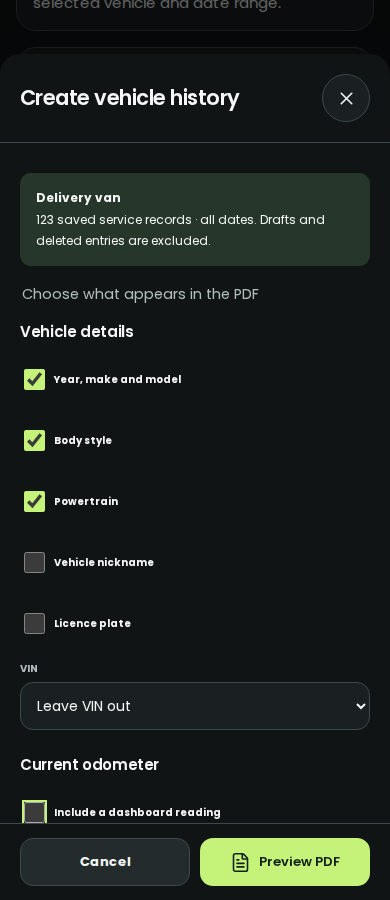
When it's time for a new set of keys, turn your saved service records into a vehicle history you can share or print.
No account to create. Records stored on your device. Export, back up and share when you choose.
A FEW THINGS YOU MIGHT BE WONDERING
Still have a question?
Say hello to DriveFive
Yes. DriveFive is free to use, and you don't need to create an account. It is currently in closed testing on Android.
Yes. DriveFive supports gas, hybrid and electric vehicles, with fuel and charging records in litres and kWh. Keep each vehicle's records in your garage.
No. NFC is optional. You can record trips manually or use GPS without a tag. With a compatible Android phone and NFC tag, a tap can select your vehicle and start the trip workflow.
Your records are stored on your device. You can create backups and export or share information yourself. Make regular backups before changing phones or uninstalling the app.
Yes. Create a printable vehicle history from your saved service records, including the work recorded and the odometer reading at the time. Choose the vehicle details you want included before creating the PDF.
DriveFive is currently in closed testing. Request tester access below. If you're already enrolled, open Google Play using the Google account registered for the test. The app requires Android 8 or later.

PHONE. WALLET. KEYS. LOGBOOK. LET'S GO.
Try DriveFive for Android.
Currently in closed testing—tester access is required.
Free to use · No account required · Android 8+
FROM THE DRIVEFIVE BLOG
Practical guides for the records you keep and the journeys ahead.
Mileage records
What to capture, what to check and how to keep a copy.
NFC & GPS
A practical guide to NFC setup and choosing a category.
Vehicle care
Choose the details and share a clear, printable report.